<?xml version="1.0" encoding="utf-8"?><feed xmlns="http://www.w3.org/2005/Atom" ><generator uri="https://jekyllrb.com/" version="4.4.1">Jekyll</generator><link href="https://diegopetrucci.github.io/dev/feed.xml" rel="self" type="application/atom+xml" /><link href="https://diegopetrucci.github.io/dev/" rel="alternate" type="text/html" /><updated>2026-11-16T18:29:24+00:00</updated><id>https://diegopetrucci.github.io/dev/feed.xml</id><title type="html">diegopetrucci/dev</title><subtitle>Notes on AI agents, developer workflows, and practical experiments from real projects.</subtitle><author><name>Diego Petrucci</name></author><entry><title type="html">What’s new in the last harness — August 2026</title><link href="https://diegopetrucci.github.io/dev/whats-new-in-the-last-harness" rel="alternate" type="text/html" title="What’s new in the last harness — August 2026" /><published>2026-08-05T00:00:00+00:00</published><updated>2026-08-05T00:00:00+00:00</updated><id>https://diegopetrucci.github.io/dev/whats-new-in-the-last-harness</id><content type="html" xml:base="https://diegopetrucci.github.io/dev/whats-new-in-the-last-harness"><![CDATA[<p>A lot has changed in the latest versions of <a href="https://github.com/diegopetrucci/the-last-harness">the last harness</a>, my best take on what an AI coding harness should look like.</p>

<h3 id="token-usage-has-been-massively-cut-down">Token usage has been massively cut down</h3>

<p>A lot of the work has focused on cutting token waste and reducing errors and tooling issues. The results from my own usage are promising: token consumption is down ~18%. That percentage is made up, but it reflects how the change feels day to day.</p>

<p>The main culprit was pi-subagents. TLH used to use <a href="https://github.com/nicobailon/pi-subagents">nicobailon’s version</a>, with just a few additions of its own. That project is brilliant, but it has grown very complex, and its schemas exposed a lot of unnecessary tooling to the main agent. This polluted the context and burned tokens for no real gain.</p>

<p>TLH now embeds its own very, very trimmed-down version, tailored to what it actually uses.</p>

<p>I’ve started similar work on every other dependency. I’ve also completely removed <a href="https://github.com/rtk-ai/rtk">RTK</a>, <a href="https://www.stet.sh/blog/gpt-56-token-saving-modes">which seems to cause more token waste than gain</a>, and the <a href="https://github.com/ShpetimA/pi-fff">FFF search</a>. Pi extension makers: be very mindful of what your work ships!</p>

<h3 id="reliability">Reliability</h3>

<p>The pi-subagents library had grown beyond what TLH needed, and cracks were starting to show. I noticed more and more failures while subagents like the developer and librarian were running. Nothing catastrophic, but enough to burn tokens and subscription quota and slow development down.</p>

<p>The architect, TLH’s primary agent, now checks in on subagents more often. Hard timeouts have dropped as a result, because it can steer their work and keep an eye on them.</p>

<p>In practice, subagents now mostly work asynchronously. Refined prompts and new soft timeouts help them wrap up earlier and more concisely.</p>

<p>This has also reduced the <code class="language-plaintext highlighter-rouge">cache miss</code> warnings recently introduced by <a href="https://pi.dev"><code class="language-plaintext highlighter-rouge">pi</code></a>.</p>

<h3 id="subagents-ux-tweaks">Subagents UX tweaks</h3>

<p>Subagents now show which ticket they’re analysing or working on (especially the developer!), the TUI is less cluttered, and it’s clearer when one is stuck or just “thinking”.</p>

<h3 id="herdr-and-cmux-support">Herdr and Cmux support</h3>

<p>TLH now correctly sends its working status to both <a href="https://herdr.dev">Herdr</a> and <a href="https://cmux.com">Cmux</a>. Before, TLH was shown as working only when the architect was doing something; now, subagents’ work is tracked too. By the way, give both a try—they’re great: Herdr on your always-on machine, Cmux locally.</p>

<h2 id="whats-next-for-tlh">What’s next for TLH</h2>

<p>In the short term, I want TLH to become leaner, more reliable, and a little more customisable. The next few releases will focus on those goals. I want TLH to work for everyone who buys into its philosophy, and I don’t think we’re there yet.</p>

<p>In the longer term, I’ve noticed a pattern in my own usage: I no longer spawn a gazillion sessions for different pieces of work. Instead, I tend to use one long-lived session with a high-level view of everything that’s going on.</p>

<p>Improvements in model compaction have made this possible, but there’s still UX work to do, and I don’t think any of the major harnesses have quite nailed it yet. I have some ideas, and hopefully I’ll have more to share soon.</p>]]></content><author><name>Diego Petrucci</name></author><summary type="html"><![CDATA[A lot has changed in the latest versions of the last harness, my best take on what an AI coding harness should look like.]]></summary></entry><entry><title type="html">Automate the boring things by running agent loops at night</title><link href="https://diegopetrucci.github.io/dev/running-agent-loops-while-away" rel="alternate" type="text/html" title="Automate the boring things by running agent loops at night" /><published>2026-03-08T09:00:00+00:00</published><updated>2026-03-08T09:00:00+00:00</updated><id>https://diegopetrucci.github.io/dev/running-agent-loops-while-away</id><content type="html" xml:base="https://diegopetrucci.github.io/dev/running-agent-loops-while-away"><![CDATA[<p>As I work on side-projects I tend to accumulate smaller TODOs, like bugs, infra updates, analytics, that I struggle to justify focusing on while I’m directly in front of my machine. While I could spin off an agent in the background, I still find myself distracted by it, and I don’t think this setup is productive.</p>

<p>To fix this, I’ve thought about agents going through these tasks at night, so that when I wake up I can find some amount of work done. Up until now I’ve been using <a href="https://github.com/marcus/nightshift">NightShift</a> to do it. It’s an interesting project, but for my taste it’s too complicated. <a href="/dev/self-improving-agents">I like simple stuff</a>, tailored to my exact needs without too much configuration, and I found it was either breaking or needing too much babysitting to justify itself.</p>

<p>Hence, as an interim setup, I have experimented with cron jobs and OpenClaw triggers. It has been… fine. But OpenClaw is a chunky boy, doing a lot of things, and doing a lot of things means a lot can go wrong. Specialised tools always work better in my experience.</p>

<p>Enter <a href="https://code.claude.com/docs/en/scheduled-tasks">Anthropic’s new <code class="language-plaintext highlighter-rouge">/loop</code> functionality</a>. It’s very recent, and has some quirks I don’t love, but it seems like it can do the job for a lot of people.</p>

<h3 id="my-night-agent-setup">My night agent setup</h3>

<p>In each project, I keep a root-level, git ignored <code class="language-plaintext highlighter-rouge">todos.md</code>. As I work, I dump stuff in it quite freely.</p>

<p>I use a completely separate checkout for my night agent, so it doesn’t touch my WIP branch(es). Yes, I could use worktrees, but separate checkouts are simpler to deal with mentally for me.</p>

<p>In this ad-hoc checkout I run one loop overnight — a run per night is enough, especially across multiple repos. I don’t want to babysit five draft PRs every morning.</p>

<h3 id="the-loop-prompt">The <code class="language-plaintext highlighter-rouge">/loop</code> prompt</h3>

<p>This is the prompt I currently use:</p>

<div class="language-markdown highlighter-rouge"><div class="highlight"><pre class="highlight"><code><span class="p">1.</span> switch to main
<span class="p">2.</span> pull remote
<span class="p">3.</span> create a new branch
<span class="p">4.</span> pick an item from the todos.md file
<span class="p">5.</span> validate if it is still valid — if it is, investigate it
<span class="p">6.</span> think of three ways to address it
<span class="p">7.</span> pick one and implement it
<span class="p">8.</span> run builds and tests
<span class="p">9.</span> if your solution is successful, open a draft PR. in the description add the other two options you considered, and write why you chose this one
<span class="p">10.</span> if your solution is not successful write a document in <span class="sb">`.docs/failed-nightly-experiments/`</span> explaining what you tried, the other two options, and why it failed. open a draft pr
</code></pre></div></div>

<p>This gives me useful morning input instead of a blank slate: either a draft PR I can review, or a failed attempt with actual reasoning I can reuse.</p>

<p>Sometimes the output is great, sometimes it’s not, and that’s fine.</p>

<h3 id="some-loop-quirks">Some <code class="language-plaintext highlighter-rouge">/loop</code> quirks</h3>

<p><a href="https://code.claude.com/docs/en/scheduled-tasks">Honestly just read the docs</a>, but in them there’s a couple of surprises:</p>

<ul>
  <li>You need to have a Claude Code instance running “permanently”. If you close it… puff, the loop is gone</li>
  <li>Loops auto-expire after three days. I understand the safety aspect, but Claude Desktop scheduled tasks don’t have this limitation, so you might want to set them up from there</li>
</ul>

<h3 id="so">So?</h3>

<p><code class="language-plaintext highlighter-rouge">/loop</code> seems like a good first draft, and I’m writing about it because I think it will be useful for a lot of people. But the limitations are weird, and if they’re deal breakers for you, I’d recommend writing your own solution. I have mine as a work in progress, and hopefully I’ll get to share it soon.</p>]]></content><author><name>Diego Petrucci</name></author><category term="agents" /><category term="llm" /><category term="ai" /><category term="claudecode" /><category term="automation" /><summary type="html"><![CDATA[As I work on side-projects I tend to accumulate smaller TODOs, like bugs, infra updates, analytics, that I struggle to justify focusing on while I’m directly in front of my machine. While I could spin off an agent in the background, I still find myself distracted by it, and I don’t think this setup is productive.]]></summary></entry><entry><title type="html">Implementing OpenClaw in Swift and Vapor, part 1: telegram bot &amp;amp; Anthropic APIs</title><link href="https://diegopetrucci.github.io/dev/implementing-openclaw-in-swift-and-vapor-part-1-telegram-bot-and-llm-api" rel="alternate" type="text/html" title="Implementing OpenClaw in Swift and Vapor, part 1: telegram bot &amp;amp; Anthropic APIs" /><published>2026-02-23T09:00:00+00:00</published><updated>2026-02-23T09:00:00+00:00</updated><id>https://diegopetrucci.github.io/dev/implementing-openclaw-in-swift-and-vapor-part-1-telegram-bot-and-llm-api</id><content type="html" xml:base="https://diegopetrucci.github.io/dev/implementing-openclaw-in-swift-and-vapor-part-1-telegram-bot-and-llm-api"><![CDATA[<p>A lot (!) of people are talking about OpenClaw, but not many seem to know how it actually works under the hood.</p>

<p>Its core components, however, are surprisingly simple — and I think trying to reimplement it could be a good introduction for engineers to these new systems, as you end up learning a lot about orchestration, tool execution boundaries &amp; safety, and where model prompts stop and system design starts.</p>

<p>Hence, I have been building my own version in Swift, using Vapor for the backend: <a href="https://github.com/diegopetrucci/claudio/">diegopetrucci/claudio</a>. The project is loosely based on this write-up by Dabit: <a href="https://gist.github.com/dabit3/bc60d3bea0b02927995cd9bf53c3db32">How OpenClaw works</a>.</p>

<p>I am also building this in a compartmentalized way so that, at (almost) any point, it can be run locally as a usable slice of the final system. I prefer this over trying to wire everything at once and only getting value at the end.</p>

<p>With that out of the way, let’s talk about the first tranche of changes:</p>

<ol>
  <li>Setting up the Telegram bot interface</li>
  <li>Interfacing with Anthropic’s API from the Vapor backend</li>
</ol>

<p>Scope-wise, this covers the code from the very first commit <a href="https://github.com/diegopetrucci/claudio/tree/df2c8d55dd20613ef8bc3c277e3b545d677b359f">up to being able to send messages</a>. That link lets you browse the repo at that exact moment in time.</p>

<p>As a note, I won’t cover how to set up Vapor. I’m not an expert, and <a href="https://docs.vapor.codes/">their docs are great</a>.</p>

<h3 id="telegram-and-anthropic-api-prep">Telegram and Anthropic API prep</h3>

<p>Go to Telegram, chat with the <a href="https://telegram.me/BotFather">BotFather</a> bot, and create your own. Write your ID in Vapor’s <code class="language-plaintext highlighter-rouge">.env</code>, make sure it’s ignored by git, and completely forget about it.</p>

<p>Do the same for Anthropic’s API key.</p>

<p>We are also using the <a href="https://github.com/jamesrochabrun/SwiftAnthropic">SwiftAnthropic library</a> to talk with Anthropic’s API.</p>

<h3 id="our-starting-point">Our starting point</h3>

<p>Before adding memory, tools, or any autonomous loops, we want the minimum end-to-end path:</p>

<ul>
  <li>Send the bot a message</li>
  <li>Receive a reply</li>
</ul>

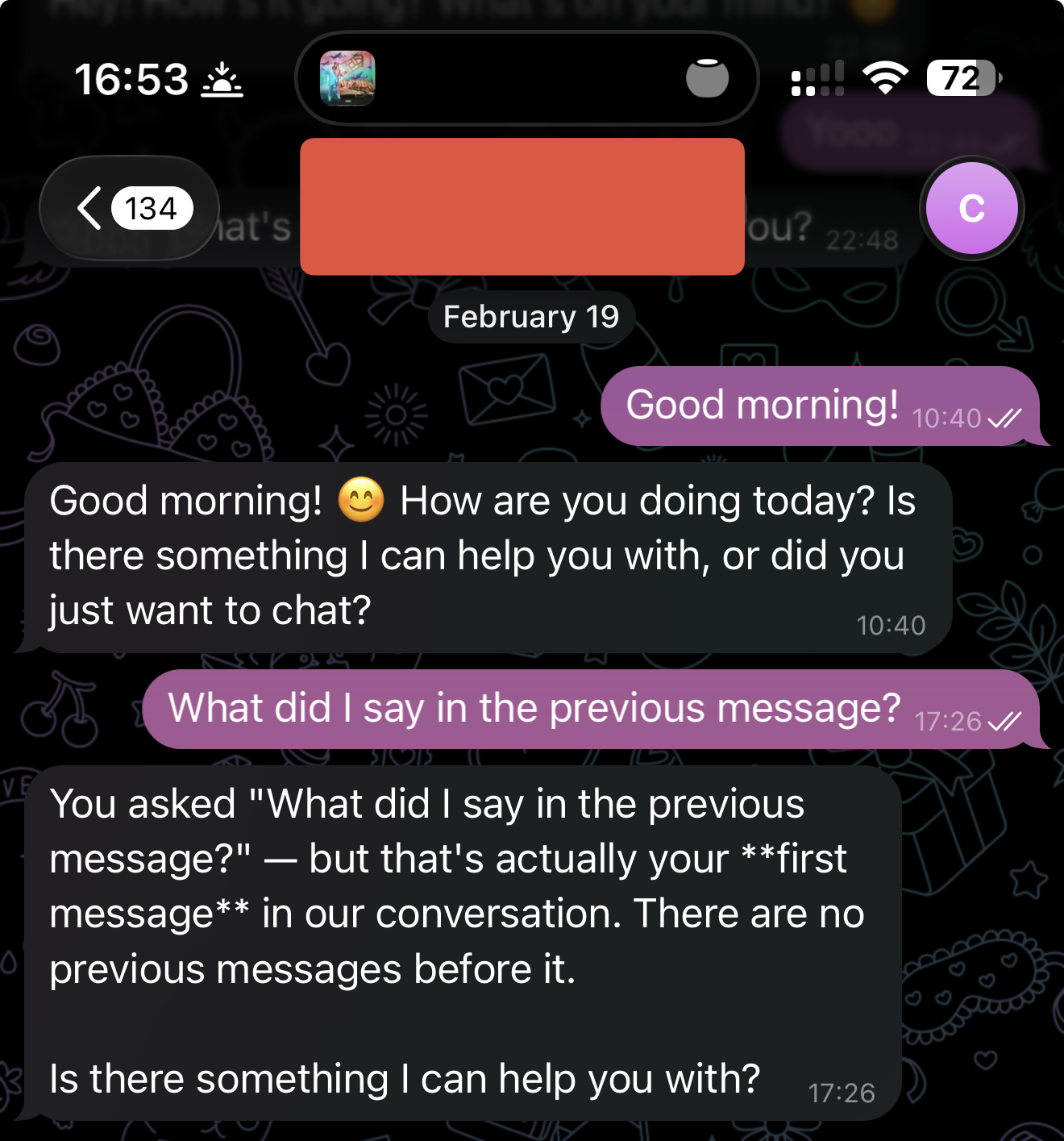
<p>We are not concerned yet with any state persistence — each message will be a brand new “conversation:</p>

<p><img src="/dev/assets/reimplementing-openclaw/amnesia-convo.png" alt="Telegram chat showing per-message amnesia" /></p>

<h3 id="the-modules">The modules</h3>

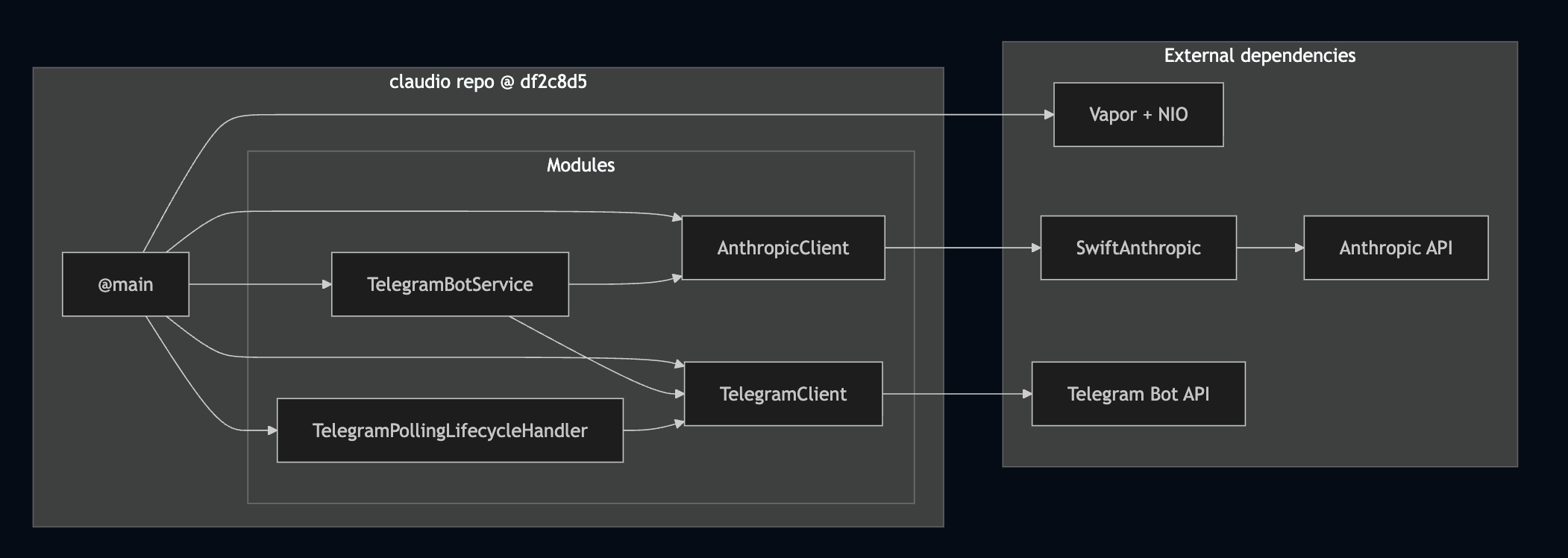
<p>The project is structured in a few Swift packages, and please note that we will ignore Docker for now:</p>

<p><img src="/dev/assets/reimplementing-openclaw/part-one-modules-diagram.png" alt="Architecture diagram" /></p>

<p>The architecture is quite simple:</p>

<ul>
  <li><strong>AnthropicClient</strong>: sets up the <code class="language-plaintext highlighter-rouge">Anthropic</code> API call, sends it the user message, and receives a reply</li>
  <li><strong>TelegramClient</strong>: thin wrapper around Telegram’s <code class="language-plaintext highlighter-rouge">sendMessage</code> and <code class="language-plaintext highlighter-rouge">getUpdates</code> APIs</li>
  <li><strong>TelegramBotService</strong>: orchestrates bot behavior for incoming text: takes a Telegram message, asks Anthropic for a reply, then sends that reply back to Telegram</li>
  <li><strong>TelegramPollingLifecycleHandler</strong>: where more of the magic lives, as it runs the long-polling loop as a Vapor lifecycle component. It continuously fetches updates from Telegram, filters/processes valid user text messages, invokes the bot service handler, and handles retry/cancellation/shutdown</li>
</ul>

<p>Admittedly, <code class="language-plaintext highlighter-rouge">TelegramPollingLifecycleHandler</code> is already doing too much, but we will deal with that in the future.</p>

<h2 id="what-comes-next">What comes next</h2>

<p>Memory! As mentioned, the bot at the moment has per-message amnesia, as it has no concept of a history or previous messages.</p>

<p>As a reminder, if you want to follow along, the code is in <a href="https://github.com/diegopetrucci/claudio/">diegopetrucci/claudio</a> and this post’s scope ends at commit <a href="https://github.com/diegopetrucci/claudio/commit/df2c8d55dd20613ef8bc3c277e3b545d677b359f"><code class="language-plaintext highlighter-rouge">df2c8d55dd20613ef8bc3c277e3b545d677b359f</code></a>.</p>

<p>I did not start the project thinking of writing about it, so the first few commits are not semantically marked (the subsequent ones all have a prefix). But I’m sure you’ll get the gist.</p>]]></content><author><name>Diego Petrucci</name></author><category term="agents" /><category term="llm" /><category term="ai" /><category term="swift" /><category term="vapor" /><category term="telegram" /><category term="anthropic" /><summary type="html"><![CDATA[A lot (!) of people are talking about OpenClaw, but not many seem to know how it actually works under the hood.]]></summary></entry><entry><title type="html">A simple way to add memory to agents and make them self-improve</title><link href="https://diegopetrucci.github.io/dev/self-improving-agents" rel="alternate" type="text/html" title="A simple way to add memory to agents and make them self-improve" /><published>2026-02-10T07:00:00+00:00</published><updated>2026-02-10T07:00:00+00:00</updated><id>https://diegopetrucci.github.io/dev/self-improving-agents</id><content type="html" xml:base="https://diegopetrucci.github.io/dev/self-improving-agents"><![CDATA[<p>LLM agents are great, but them not having memory and not “learning on the job” is less than ideal. Take <code class="language-plaintext highlighter-rouge">AGENTS.md</code>, a hack born out this need.</p>

<p>These days there’s quite a lot of discourse on X about ways to improve this flow, and to make agents learn automatically. People have come up with very complicated setups, but I like simple stuff (maybe a skill issue, who knows). This is what I got so far:</p>

<ol>
  <li>For each project, I add a short section to <code class="language-plaintext highlighter-rouge">AGENTS.md</code> that tells the agent to keep a private notes file (<code class="language-plaintext highlighter-rouge">.agents/notes.md</code>) and update it every time it learns something new, I correct it, or it finds something wrong.</li>
  <li>Each note starts with a counter, beginning at <code class="language-plaintext highlighter-rouge">[0]</code>.</li>
  <li>Before writing a new note, it checks if the idea is already there.</li>
  <li>If it is, it just increments the counter.</li>
  <li>When a note reaches <code class="language-plaintext highlighter-rouge">[3]</code>, it promotes it into the main <code class="language-plaintext highlighter-rouge">AGENTS.md</code> instructions.</li>
</ol>

<p>This is all to avoid having to manually edit the agents file for corrections, or having to tell them to do it within conversations.</p>

<p>I use Codex primarily, and I’ve found that it loves to write <em>a lot</em> of notes, which is kind of cute. Plus the file doubles as a nice history of the project.</p>

<p>I’ve been using this strategy for just a week-ish, so I haven’t hit issues with memories being too long; but I assume eventually I’ll need to prune them manually, or tell the agents to do it if eg the number of items is &gt; N.</p>

<p>For reference, this is the section in my agents file. It’s messy as I wrote it in one go, but it works well enough for now:</p>

<div class="language-markdown highlighter-rouge"><div class="highlight"><pre class="highlight"><code><span class="gu">## Agent notes</span>
<span class="p">
-</span> Every time you learn something new, or how to do something in the codebase, if you make a mistake that the user corrects, if you find yourself running commands that are often wrong and have to tweak them: write all of this down in <span class="sb">`.agents/notes.md`</span>. This is a file just for you that your user won't read.
<span class="p">-</span> If you're about to write to it, first check if what you're writing (the idea, not 1:1) is already present. If so, increment the counter in the prefix (eg from <span class="sb">`[0]`</span> to <span class="sb">`[1]`</span>). If it's completely new, prefix it with <span class="sb">`[0]`</span>. Once a comment hits the count of <span class="sb">`3`</span>, codify it into this AGENTS.md file in the <span class="sb">`## Misc`</span> section.
</code></pre></div></div>

<p>Some of the notes it’s been taking so far:</p>

<div class="language-markdown highlighter-rouge"><div class="highlight"><pre class="highlight"><code><span class="gh"># Notes</span>
<span class="p">
-</span> [0] In this repo environment, Xcode output formatter is <span class="sb">`xcsift`</span> (path: <span class="sb">`/opt/homebrew/bin/xcsift`</span>), not <span class="sb">`xcswift`</span>.
<span class="p">-</span> [0] When moving image detail presentation from <span class="sb">`MenubarFeature`</span> internals to <span class="sb">`SendItToMyMenuBarApp.swift`</span>, <span class="sb">`MenubarImageDetailScreen`</span> must be <span class="sb">`public`</span> (including <span class="sb">`public init`</span> and <span class="sb">`public var body`</span>) because app target imports it from the package module.
<span class="p">-</span> [0] Menubar image detail presentation is now modeled as <span class="sb">`Window/window`</span> in <span class="sb">`MenubarFeature`</span> (not <span class="sb">`Sheet/sheet`</span>) to match macOS window behavior.
<span class="p">-</span> [3] Keep <span class="sb">`#if/#endif`</span> directives indented to match the surrounding SwiftUI modifier chain indentation in this repo.
<span class="p">-</span> [2] When running <span class="sb">`xcodebuild`</span> commands, if another build is active or <span class="sb">`build.db`</span> is locked, retry with exponential backoff starting at 10 seconds, up to 5 attempts.
<span class="p">-</span> [0] In zsh shell snippets, avoid assigning to <span class="sb">`status`</span> (read-only); use <span class="sb">`rc`</span> or another variable name for exit codes.
<span class="p">-</span> [0] <span class="sb">`MenubarScreen.onAppear`</span> is an effective hook for “menu bar opened” behavior in the macOS menu bar app.
<span class="p">-</span> [0] In <span class="sb">`MenubarFeature`</span>, AppKit side effects (<span class="sb">`NSApplication`</span> activation/termination/window foreground) should be triggered from reducer effects via a dependency provider, not called directly from SwiftUI views.
</code></pre></div></div>

<p>And what it promoted to the <code class="language-plaintext highlighter-rouge">AGENTS.md</code>:</p>

<div class="language-markdown highlighter-rouge"><div class="highlight"><pre class="highlight"><code><span class="gh"># Misc</span>
<span class="p">
-</span> Keep <span class="sb">`#if/#endif`</span> directives indented to match the surrounding SwiftUI modifier chain indentation in this repo.
</code></pre></div></div>

<p>That’s it. No skills, nor complicated setups.</p>

<p>Give this a try, and please let me know at <a href="https://x.com/diegopetrucci">@diegopetrucci</a> if you have improvements, if you hate it, or anything else. This is all new for everybody!</p>]]></content><author><name>Diego Petrucci</name></author><category term="agents" /><category term="llm" /><category term="ai" /><category term="self-improvement" /><summary type="html"><![CDATA[LLM agents are great, but them not having memory and not “learning on the job” is less than ideal. Take AGENTS.md, a hack born out this need.]]></summary></entry><entry><title type="html">Keeping global commands for CLI agents in sync</title><link href="https://diegopetrucci.github.io/dev/keeping-agents-commands-in-sync" rel="alternate" type="text/html" title="Keeping global commands for CLI agents in sync" /><published>2025-12-03T09:00:00+00:00</published><updated>2025-12-03T09:00:00+00:00</updated><id>https://diegopetrucci.github.io/dev/keeping-agents-commands-in-sync</id><content type="html" xml:base="https://diegopetrucci.github.io/dev/keeping-agents-commands-in-sync"><![CDATA[<p>Lately, I’ve found myself in this predicament:</p>

<ol>
  <li>I write a lot of code using CLI agents</li>
  <li>I switch often between them as none has a particularly strong moat</li>
  <li>I have a set of global custom commands that I like to use across projects</li>
</ol>

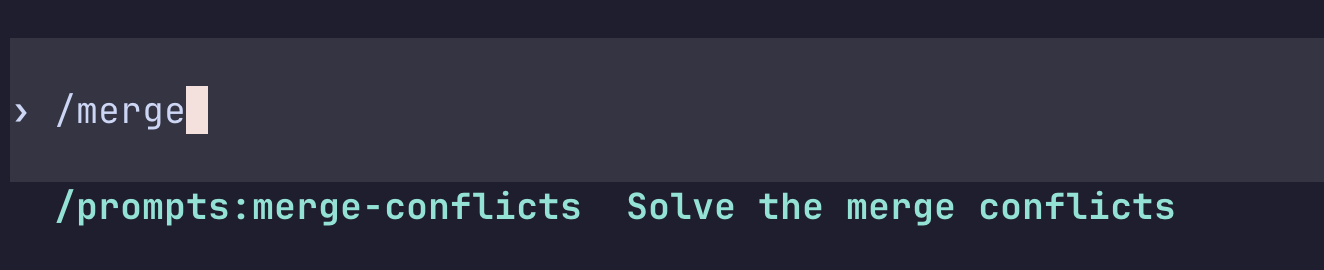
<p>For reference, custom commands are user-defined prompts. For example:</p>

<p><img src="/dev/assets/custom-prompts.png" alt="Calling a command" /></p>

<p>Hence, I need to have a way to keep them in sync. I’ve solved syncing my setup across different machines by using dotfiles and chezmoi, but, so far, I had no real solution for keeping the commands themselves in sync.</p>

<p>After some research, I’ve more or less collected all the places where these agents store their configs:</p>

<ul>
  <li>Amp: <code class="language-plaintext highlighter-rouge">~/.config/amp/commands</code></li>
  <li>Claude: <code class="language-plaintext highlighter-rouge">~/.claude/commands</code></li>
  <li>Codex: <code class="language-plaintext highlighter-rouge">~/.codex/prompts</code></li>
  <li>Cursor: <code class="language-plaintext highlighter-rouge">~/.cursor/commands</code></li>
  <li>Gemini: <code class="language-plaintext highlighter-rouge">~/.gemini/commands</code></li>
  <li>Opencode: <code class="language-plaintext highlighter-rouge">~/.config/opencode/command</code></li>
</ul>

<p>To make my life easier, <a href="https://github.com/diegopetrucci/dot/blob/main/.codex/prompts/sync-global-agents-commands.md">I’ve also created a custom command</a> that I run once in a while to keep them all updated:</p>

<div class="language-markdown highlighter-rouge"><div class="highlight"><pre class="highlight"><code>Check each of these directories:

~/.codex/prompts
~/.claude/commands
~/.cursor/commands
~/.config/opencode/command
~/.config/amp/commands
~/.gemini/commands

If any of them contains an <span class="sb">`.md`</span> that the others do not, or a newer version, sync it to the other directories too.
</code></pre></div></div>

<p>It works well enough for my needs. Oh, and in case you’re curious, <a href="https://github.com/diegopetrucci/dot/">these are my dotfiles</a>.</p>]]></content><author><name>Diego Petrucci</name></author><category term="agents" /><category term="llm" /><category term="ai" /><category term="claudecode" /><category term="cli" /><category term="codex" /><category term="gemini" /><category term="amp" /><category term="opencode" /><category term="cursor" /><summary type="html"><![CDATA[Lately, I’ve found myself in this predicament:]]></summary></entry><entry><title type="html">Having claude code review your PR</title><link href="https://diegopetrucci.github.io/dev/llm-command-to-review-your-branch" rel="alternate" type="text/html" title="Having claude code review your PR" /><published>2025-06-24T09:00:00+00:00</published><updated>2025-06-24T09:00:00+00:00</updated><id>https://diegopetrucci.github.io/dev/llm-command-to-review-your-branch</id><content type="html" xml:base="https://diegopetrucci.github.io/dev/llm-command-to-review-your-branch"><![CDATA[<p>Anthropic recently released <a href="https://support.anthropic.com/en/articles/10167454-using-the-github-integration">a GitHub integration for Claude Code</a> that reviews your PRs. It’s similar to other ones like Copilot, but I’ve found it to be more in-depth and better at catching things other agents couldn’t.</p>

<p>However, it’s quite expensive — about half a dollar per PR. I can’t really justify that for a labour-of-love-style side project, so given that Anthropic exposes the prompt, I’ve ended up copying it into a <a href="https://github.com/diegopetrucci/ai-stuff/blob/02844fc20ca3440238859b2f778f450feb309692/commands/pr-review.md">commands/pr-review.md file</a>.</p>

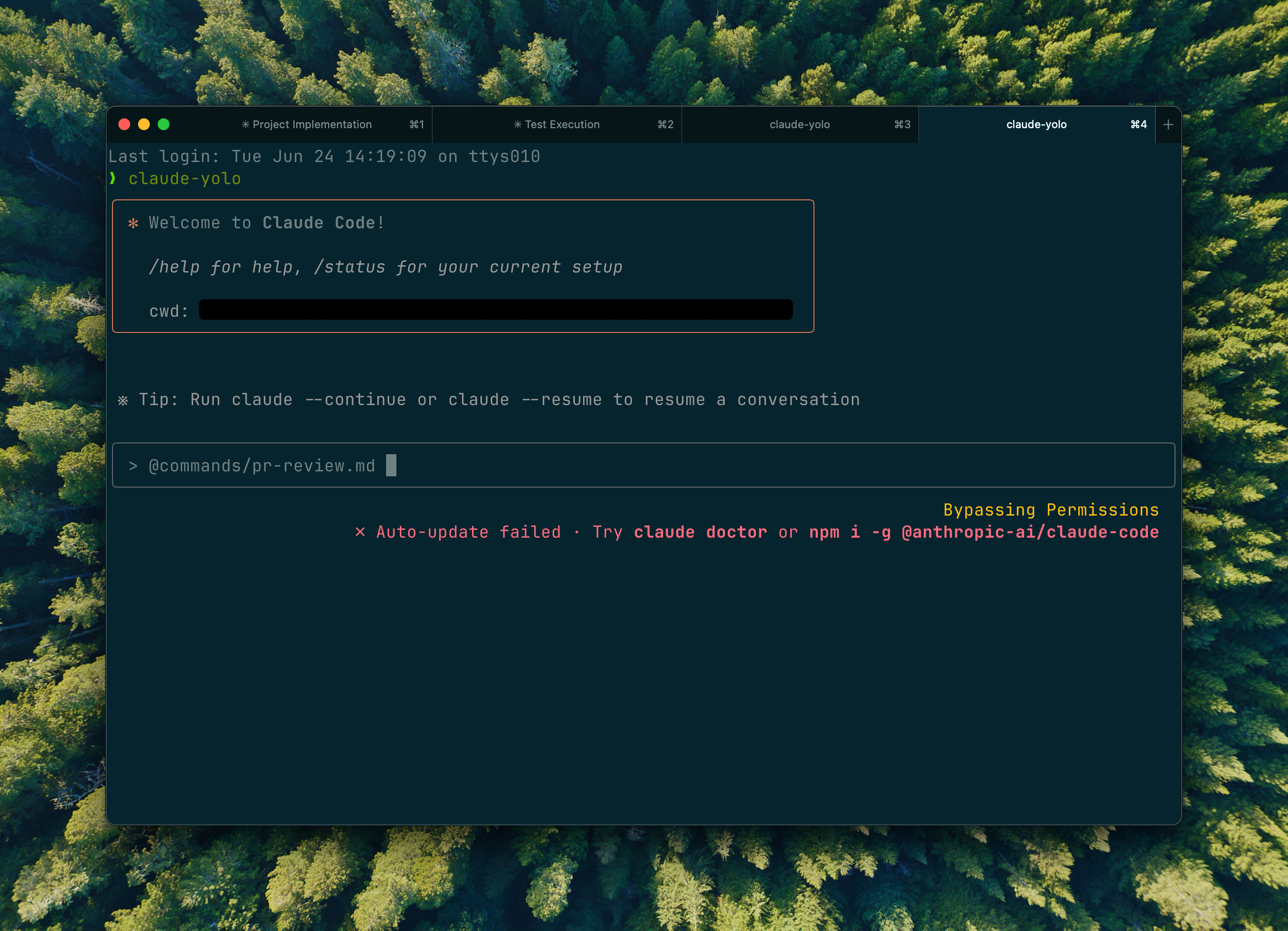
<p>Whenever I’m finished with a branch, I spin up a new instance of Claude Code and run it via <code class="language-plaintext highlighter-rouge">@commands/pr-review.md</code>. I avoid using the same instance of CC that was making the changes to remove the context it accumulated, kind of like having a person who isn’t you review it.</p>

<p><img src="/dev/assets/calling-pr-review-command.png" alt="Calling the command" /></p>

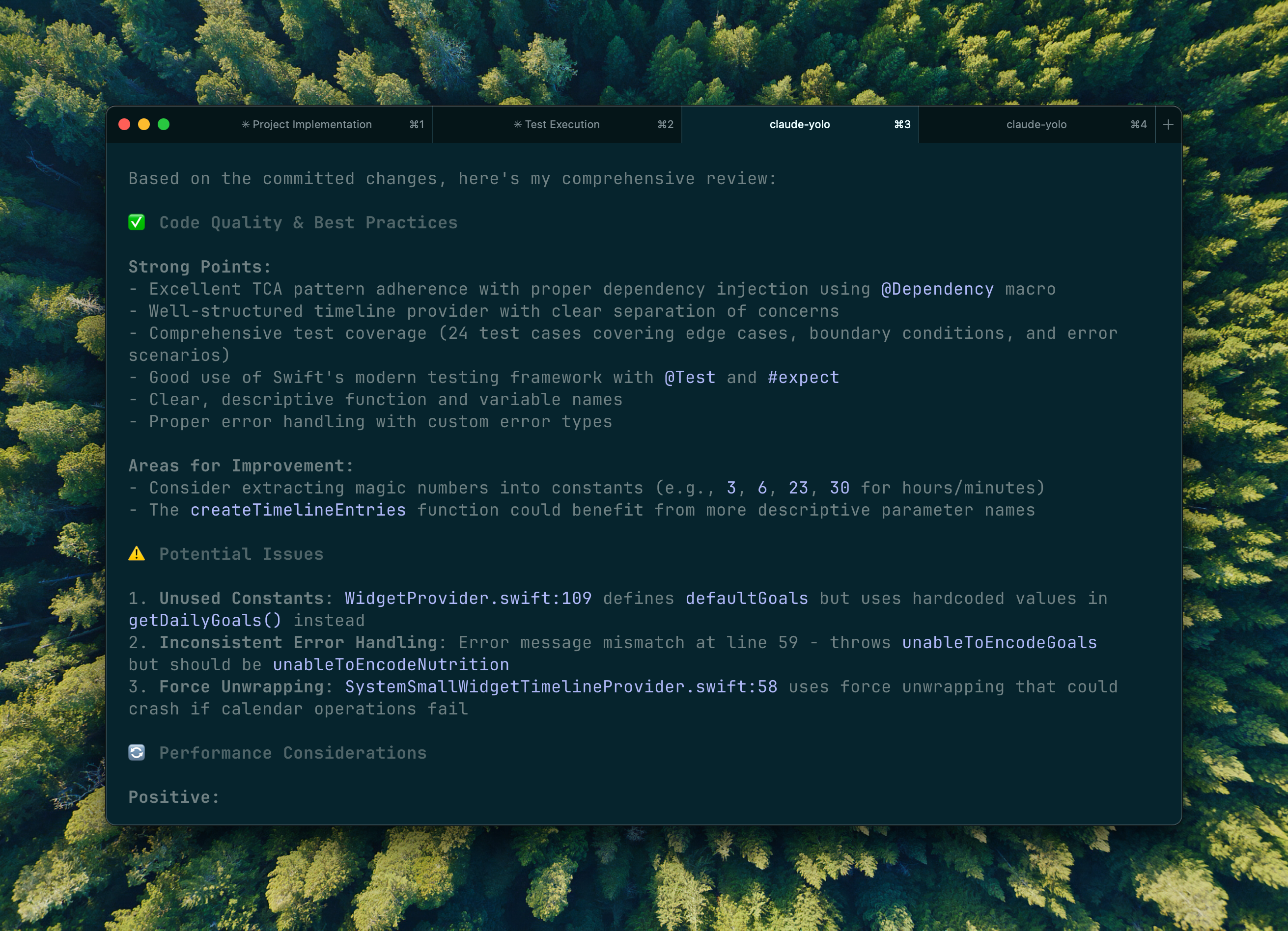
<p>These are (part of) the results:</p>

<p><img src="/dev/assets/pr-review-command-result.png" alt="PR review by claude" /></p>

<p>I am wondering if the “niceties” could be omitted and have it just focus on the potential issues, as it tends to be quite verbose, but haven’t gotten around doing that. Also, it is indeed quite funny to see it rate a PR with a less than stellar rating (eg 7.5) when it was the one writing all the code.</p>

<p>Lastly, I do tend to relay the feedback to the instance of Claude that is writing the code. It tends to work fine, but sometimes it does need a little nudge in the right direction.</p>]]></content><author><name>Diego Petrucci</name></author><category term="agents" /><category term="llm" /><category term="ai" /><category term="claudecode" /><summary type="html"><![CDATA[Anthropic recently released a GitHub integration for Claude Code that reviews your PRs. It’s similar to other ones like Copilot, but I’ve found it to be more in-depth and better at catching things other agents couldn’t.]]></summary></entry></feed>